APIs for Beginners, A Simple Guide.
Application Programming Interfaces, commonly known as APIs, are one of the most important technologies behind modern websites, mobile applications, and digital services. Every time you use a mobile banking application, order something online, log in with Google, check the weather, or make an online payment, there is a good chance that APIs are working behind the scenes.
But what exactly is an API, how does it work, and why is it important? If you are new to technology or programming, the concept may initially seem complicated. The good news is that APIs can be understood using simple examples.
This guide, ‘APIs Explained: A Simple Guide for Beginners’, explains what an API is, how APIs work, the different types of APIs, common API examples, API requests and responses, benefits, security, and why APIs are essential for modern software development.
What Is an API?
An API, or Application Programming Interface, is a set of rules and methods that allows different software applications to communicate with each other.
In simple terms, an API acts as a bridge between two systems. One application can request information or a service from another application through an API without needing to understand how the other system works internally.
For example, imagine that you are using a weather application on your smartphone. The application may not collect weather information itself. Instead, it can send a request to a weather service through an API. The weather service processes the request and sends information such as temperature, humidity, and weather conditions back to the application.
The application then displays that information in a format that is easy for you to understand.
A Simple API Example
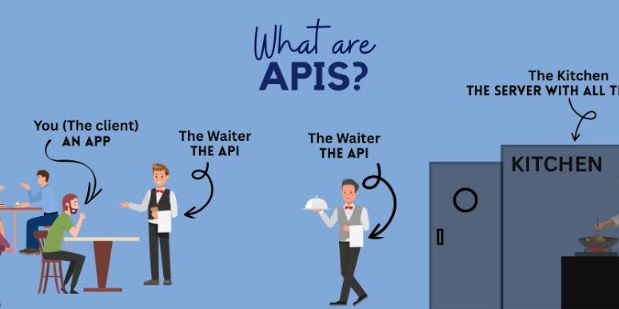
Think of an API like a waiter in a restaurant.
You are the customer, the kitchen is the system that processes your order, and the waiter is the API.
You tell the waiter what you want. The waiter takes your order to the kitchen, the kitchen prepares it, and the waiter brings the result back to you.
Similarly, an API receives a request from one application, sends it to the appropriate system, and returns the requested information or result.
How Do APIs Work?
Understanding how APIs work becomes easier when you break the process into a few simple steps.
The Client Sends a Request
The process usually begins when a client application makes a request. A client could be a website, smartphone application, desktop application, or another software system.
For example, a weather application may request the current temperature for a particular city.
The API Receives the Request
The API receives the request and determines what the client is asking for. It may check information such as the requested resource, authentication credentials, and other parameters.
The Server Processes the Request
The API communicates with the server or database responsible for providing the requested information.
The server processes the request and determines the appropriate response.
The API Sends a Response
After processing the request, the API sends a response back to the client.
The response may contain requested information, confirmation that an action was completed, or an error message if something went wrong.
The Application Displays the Result
Finally, the client application uses the API response to provide information to the user.
For example, a weather application could receive temperature data and display it as “28°C” on the screen.
What Is an API Request?
An API request is a message sent by a client to an API asking it to perform an action or provide information.
An API request can contain several important components, including the endpoint, HTTP method, parameters, headers, and sometimes a request body.
API Endpoints
An endpoint is a specific URL or location where an API can access a particular resource or service.
Different endpoints may provide access to different resources, such as users, products, payments, orders, or customer information.
HTTP Methods
APIs commonly use HTTP methods to describe what action should be performed.
The most common methods include:
- GET – Retrieves information.
- POST – Creates or submits new information.
- PUT – Updates existing information.
- PATCH – Partially updates information.
- DELETE – Removes information.
For example, a GET request might retrieve a list of products, while a POST request could create a new customer account.
What Is an API Response?
An API response is the information returned by the server after processing a request.
A response can contain the requested data, status information, or an error message.
Many modern APIs use JSON, which stands for JavaScript Object Notation, to exchange information.
A simple JSON response might look like this:
{
  "name": "John",
  "age": 25,
  "country": "Tanzania"
}
The application receiving this information can process it and display it to the user.
Types of APIs
There are several ways APIs can be classified. Understanding the major types can help beginners recognize how APIs are used in different environments.
REST APIs
REST, or Representational State Transfer, is one of the most popular approaches to building APIs.
REST APIs commonly use HTTP methods such as GET, POST, PUT, PATCH, and DELETE. They are widely used for websites, mobile applications, and cloud services.
REST APIs are popular because they are relatively simple, flexible, and easy to integrate.
SOAP APIs
SOAP stands for Simple Object Access Protocol. It is a protocol used for exchanging structured information between applications.
SOAP APIs are often associated with enterprise systems and applications that require strict standards and formal communication.
Although REST APIs are very popular today, SOAP remains important in certain industries and legacy systems.
GraphQL APIs
GraphQL is an API query language that allows clients to request exactly the information they need.
Instead of receiving a large amount of data, a client can specify which fields it wants.
This can make GraphQL useful for applications where efficient data retrieval is important.
Web APIs
Web APIs allow applications to communicate over the internet using web technologies.
For example, an online shopping website may use APIs to communicate with payment services, shipping systems, customer databases, and other platforms.
Real-World Examples of APIs
APIs are used in many digital services that people interact with every day.
Payment APIs
Online businesses can use payment APIs to connect their websites or applications with payment platforms.
When a customer pays for a product online, the website may use an API to send payment information to a payment service and receive confirmation about whether the transaction was successful.
Social Media APIs
Social media platforms can provide APIs that allow developers to integrate certain social features into applications.
For example, an application might use an API to enable users to share content or authenticate their accounts.
Maps and Location APIs
Mapping services can provide APIs that allow developers to integrate maps, directions, location information, and geographical data into applications.
Ride-hailing, delivery, travel, and logistics applications commonly depend on mapping and location technologies.
Weather APIs
Weather APIs allow applications to access current conditions, forecasts, temperature information, and other weather data.
A developer can integrate this information into a website or mobile application without building a complete weather-data system from scratch.
Authentication APIs
Authentication APIs help applications verify user identities.
For example, a website may allow users to sign in using an account from another service. The API helps facilitate communication between the applications while following authentication and authorization rules.
Why Are APIs Important?
APIs are essential because they allow software systems to work together efficiently.
APIs Save Development Time
Developers do not always need to build every feature from the beginning.
Instead, they can use an existing API to access a service or functionality provided by another system.
For example, a developer building an online store does not necessarily need to create a complete payment-processing system from scratch.
APIs Improve Integration
Modern businesses often use multiple software systems.
APIs allow these systems to communicate with one another. A business might connect its website, customer relationship management system, payment platform, accounting software, and delivery service through APIs.
APIs Support Innovation
APIs allow developers to combine existing technologies to create new products and services.
A single application can use several APIs to provide features such as payments, maps, messaging, authentication, analytics, and artificial intelligence.
APIs Improve User Experience
Many digital services depend on APIs to provide fast and convenient experiences.
When different systems communicate effectively, users can complete tasks without manually moving information between multiple platforms.
API Security
Because APIs often provide access to valuable information and services, security is extremely important.
Developers need to protect APIs against unauthorized access, data theft, abuse, and other security threats.
Authentication
Authentication verifies who is making an API request.
Common approaches include API keys, tokens, and other authentication mechanisms.
Authorization
Authentication and authorization are different.
Authentication determines who a user or application is, while authorization determines what that user or application is allowed to access.
HTTPS
APIs should generally use HTTPS to encrypt information transferred between the client and server.
Encryption helps protect sensitive information from being intercepted during transmission.
Rate Limiting
Rate limiting controls how many requests a client can make within a specific period.
This can help prevent excessive API usage, abuse, and certain types of attacks.
Common API Errors
API requests do not always succeed. When something goes wrong, APIs often return HTTP status codes that help developers understand the problem.
Some common status codes include:
- 200 OK – The request was successful.
- 201 Created – A new resource was successfully created.
- 400 Bad Request – The request contains invalid information.
- 401 Unauthorized – Authentication is required or invalid.
- 403 Forbidden – The client does not have permission.
- 404 Not Found – The requested resource could not be found.
- 500 Internal Server Error – Something went wrong on the server.
Understanding these codes is an important skill for anyone learning API development.
How Beginners Can Start Learning APIs
APIs for beginners, the do not need to become an advanced programmer immediately.
Start by understanding basic concepts such as HTTP, URLs, JSON, requests, responses, and status codes.
You can then practice making simple API requests using tools such as API testing applications or programming languages.
Learn Basic HTTP
Understanding HTTP methods and status codes provides a strong foundation for working with APIs.
Learn what GET, POST, PUT, PATCH, and DELETE mean and when each method is commonly used.
Practice With Public APIs
Many developers learn APIs by experimenting with publicly available APIs.
Try sending requests and examining the responses. This will help you understand how applications communicate with servers.
Learn JSON
JSON is widely used for exchanging data between applications.
Understanding objects, arrays, strings, numbers, and other JSON structures will make API responses easier to read and work with.
Learn a Programming Language
Once you understand the basic concepts, learning a programming language such as JavaScript, Python, Java, PHP, or another suitable language can help you build applications that consume APIs.
APIs for beginners and the Future of Technology
APIs will continue to play an important role as digital services become more interconnected.
Cloud computing, artificial intelligence, mobile applications, financial technology, e-commerce, Internet of Things devices, and business automation all depend heavily on communication between different software systems.
AI applications, for example, can use APIs to connect applications with machine learning models, databases, payment systems, cloud platforms, and other digital services.
As businesses continue to adopt digital technologies, API development and API integration are likely to remain valuable technical skills.
Final Thoughts
APIs for beginners is an important step for anyone interested in technology, programming, web development, or digital business. APIs allow different applications to communicate, exchange information, and work together without requiring developers to build every feature from scratch.
As this ‘APIs for Beginners, A Simple Guide.’is the basic process straightforward: a client sends a request, the API processes the request through the appropriate system, and a response is returned.
Whether you want to become a software developer, build websites, create mobile applications, work with cloud services, or understand how modern technology works, learning APIs can provide a valuable foundation.
Start with the basics, practice simple requests, learn JSON and HTTP, and gradually explore more advanced concepts such as authentication, API security, REST, GraphQL, and API integration.
Frequently Asked Questions About APIs
What does API stand for?
API stands for ‘Application Programming Interface’. It is a set of rules and methods that allows different software applications to communicate and exchange information.
What is an API in simple terms?
An API is like a bridge that allows two different software systems to communicate. It receives requests from one application and provides information or services from another system.
Are APIs difficult to learn?
APIs can seem complicated at first, but the basic concepts are relatively easy to learn. Beginners can start with HTTP methods, JSON, requests, responses, endpoints, and status codes.
What are APIs used for?
APIs are used for connecting applications and services. Common examples include payment processing, maps, weather information, authentication, social media integration, e-commerce, and cloud services.
What is a REST API?
A REST API is an API designed around the principles of REST, or Representational State Transfer. REST APIs commonly use HTTP methods such as GET, POST, PUT, PATCH, and DELETE to interact with resources.
Do I need programming skills to use an API?
Basic programming knowledge is helpful, especially when building applications that consume APIs. However, beginners can start by using API testing tools to understand requests and responses before writing code.
Why are APIs important for businesses?
APIs for beginners, the make facilitation in businesses to connect different software systems, automate processes, integrate third-party services, reduce development time, and create better digital experiences for customers.
What is an API endpoint?
An API endpoint is a specific URL or location where an API provides access to a particular resource or operation. Different endpoints can be used to retrieve, create, update, or delete information.